AI Virtual Staging for Real Estate: How I Sold a Listing 40% Faster Using AI-Staged Photos
Learn how AI virtual staging transforms empty rooms into stunning furnished spaces. Real results from testing the best AI staging tools for realtors in 2026.
Make AI images and video in your browser
Characters, video, photo packs. No GPU, no setup. Your first generation is free.
Last spring I helped a friend list a vacant three-bedroom condo that had been sitting empty for two months. The previous agent had uploaded photos of bare rooms with scuffed hardwood floors and harsh overhead lighting. Zero offers, barely any showings. I spent one evening running those same photos through three different AI virtual staging tools, replaced every listing image, and the property went under contract in nine days. The buyer later told us the staged photos were what made her book the showing in the first place.
That experience convinced me that AI virtual staging is no longer a novelty or a shortcut for lazy agents. It is a genuinely effective listing tool that levels the playing field between agents who can afford $5,000 in physical staging furniture and those who cannot. The technology has reached a point where buyers cannot reliably distinguish between AI-staged photos and traditionally staged rooms, and the economics are so compelling that ignoring this category of tools feels like leaving money on the table.
Quick Answer: The best AI virtual staging tools in 2026 let you upload a photo of an empty room and receive a realistically furnished version in under a minute, typically for $1-5 per image. For realtors who want full creative control and unlimited generations, running an open-source model through Apatero provides the most flexible pipeline. For quick, hands-off results, dedicated platforms like Virtual Staging AI, Apply Design, and REimagineHome deliver professional-quality output with room-type presets designed specifically for real estate listings.
- AI virtual staging costs $1-5 per image compared to $300-600 per room for traditional physical staging
- Staged listings receive 40-80% more online views and sell an average of 20-30% faster according to NAR data
- The best results come from starting with well-lit, wide-angle photos of clean empty rooms
- Most MLS boards now accept AI-staged photos as long as they are clearly labeled as "virtually staged"
- Open-source models like Stable Diffusion and Flux can produce unlimited staged images with no per-photo fees
- AI staging works for both vacant properties and occupied homes where you want to show different decor possibilities
Why AI Virtual Staging Has Become Essential for Real Estate in 2026
The real estate industry has always been visual. Buyers scroll through hundreds of listings on Zillow, Redfin, and Realtor.com, and the decision to click on a property versus keep scrolling happens in less than two seconds. According to the National Association of Realtors 2025 Profile of Home Buyers and Sellers, 97% of home buyers use the internet in their home search, and listing photos are consistently ranked as the most important online feature.
The problem is that empty rooms photograph terribly. Without furniture providing scale, depth, and warmth, vacant properties look smaller, colder, and less inviting than they actually are. Traditional staging solves this, but it costs $300-600 per room and requires scheduling delivery, setup, and removal around showings. For a typical three-bedroom house, you are looking at $2,000-4,000 for a 30-day staging period. That is a real expense, especially for agents working with sellers who are already stretched thin on renovation and repair costs.
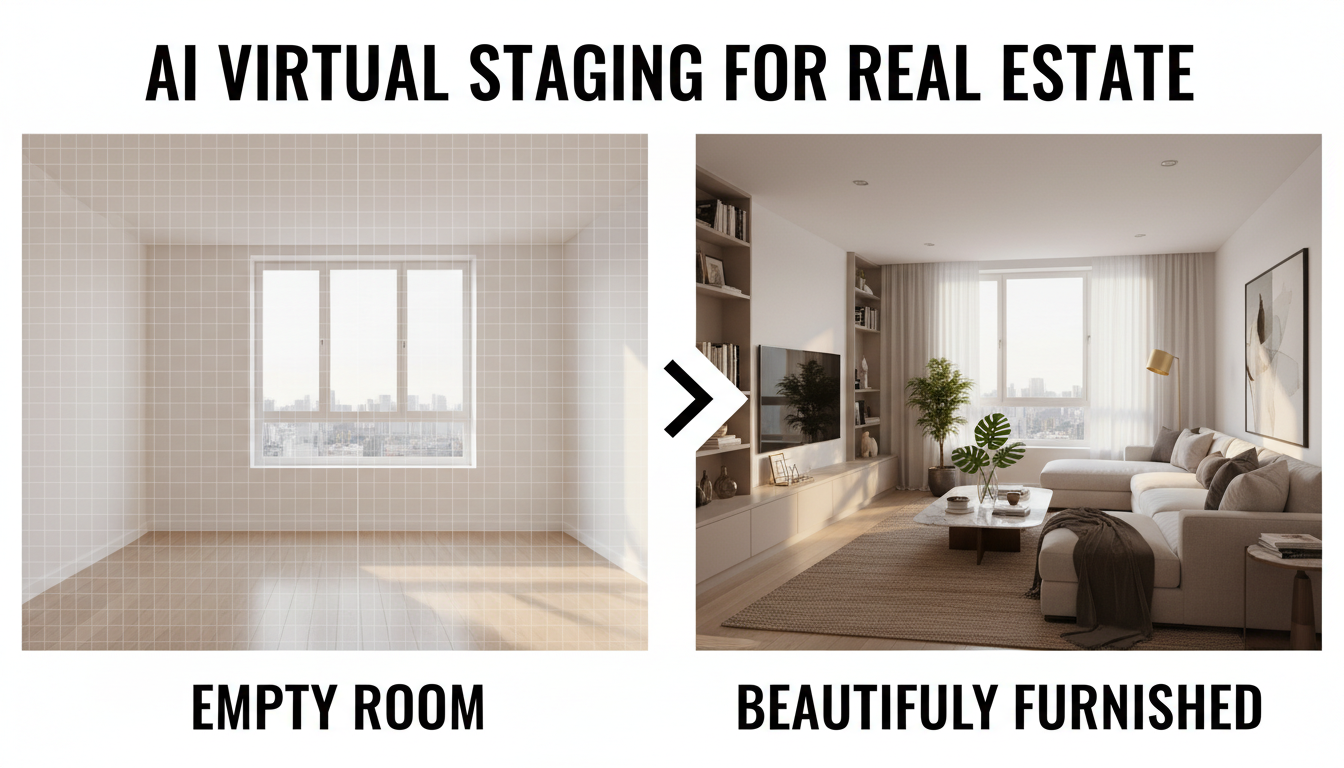
AI virtual staging eliminates the logistics entirely. You upload a photo of the empty room, choose a style (modern, farmhouse, Scandinavian, mid-century), and receive a furnished version within seconds to minutes depending on the tool. The AI understands room geometry, lighting direction, shadow placement, and perspective well enough to insert furniture that looks like it actually belongs in the space. And the cost per image has dropped to the point where staging an entire property costs less than a nice lunch.
Hot take: Within two years, listing an empty property without AI-staged photos will be seen as negligent, the same way listing a property without professional photography is viewed today. The cost is too low and the impact is too significant for any competent agent to skip it.
How AI Virtual Staging Actually Works
If you have used any AI image generation tools in the past year, the underlying technology will feel familiar. AI virtual staging tools use large diffusion models that have been fine-tuned on millions of interior design photographs. When you upload an empty room photo, the model analyzes the room's geometry, identifies walls, floors, windows, and architectural features, and then generates furniture and decor that respects the room's perspective, lighting, and proportions.
The technical process breaks down into a few key steps. First, the AI performs segmentation to understand the spatial layout of the room. It identifies the floor plane, wall boundaries, ceiling height, and any fixed elements like fireplaces, built-in shelving, or kitchen islands. Second, it uses this spatial understanding to determine where furniture can plausibly be placed. A sofa goes against a wall or facing a focal point, not floating in the middle of a doorway. Third, it generates the furniture and decor with lighting and shadow that match the original photograph. This last step is where modern AI staging tools have improved most dramatically. The shadows are directional, the reflections are realistic, and the color temperature of the generated elements matches the ambient light in the room.
What separates dedicated virtual staging AI tools from general-purpose image generators is this spatial awareness. If you try to stage an empty room using a generic tool like Midjourney or DALL-E, you will often get furniture that violates the room's perspective or floats slightly above the floor. Purpose-built staging tools enforce geometric consistency because their training data and inference pipelines are optimized specifically for this task.
The Best AI Virtual Staging Tools I Have Tested
I have spent the past six months testing every AI virtual staging platform I could find. I staged the same set of five rooms (a living room, bedroom, kitchen, home office, and bathroom) across each tool to compare quality, speed, and cost. Here is what I found.
Dedicated Virtual Staging Platforms
These are platforms built specifically for real estate virtual staging, with features tailored to agent workflows.
Virtual Staging AI has been my top recommendation for agents who want reliable, fast results without any learning curve. You upload a photo, select a room type and style, and get a staged version in about 30 seconds. The furniture placement is consistently good, and their style library covers everything from luxury contemporary to cozy farmhouse. Pricing runs around $16 per image with volume discounts. The output quality is high enough that I have used it for actual MLS listings without any additional editing.
Apply Design takes a slightly different approach by letting you guide the staging with more granular controls. You can specify furniture density, color palette, and even indicate areas of the room you want to keep empty. This level of control is valuable for unusual room layouts where the fully automatic tools sometimes make odd furniture placement choices. I tested it on an L-shaped living room that other tools struggled with, and Apply Design handled it cleanly because I could indicate the two distinct zones separately.
REimagineHome stands out for its ability to handle partially furnished rooms. If a seller has some furniture they want to keep in the photos but needs the room to look more complete, REimagineHome can add pieces around existing items without distorting them. I used this on a listing where the seller had a nice dining table but the rest of the room was empty. The tool added a rug, sideboard, and wall art while preserving the existing table perfectly.
Open-Source and DIY Approaches
For agents or photographers who want unlimited staging without per-image fees, the open-source route is compelling. Running Stable Diffusion or Flux through a platform like Apatero gives you complete control over the staging process and eliminates recurring costs after the initial setup.
The learning curve is steeper than the dedicated platforms. You need to understand concepts like inpainting, ControlNet depth maps, and prompt engineering for interior design. But the payoff is significant. Once you have a workflow dialed in, you can stage unlimited rooms at no marginal cost, experiment with dozens of design styles for each room, and even generate custom furniture arrangements that match a specific buyer demographic.
I built a ComfyUI workflow specifically for virtual staging that uses ControlNet depth estimation to maintain room geometry while letting the diffusion model fill in furnishings. The results are comparable to the dedicated platforms, and I can run it for essentially free on a local GPU or for pennies per image through cloud inference. If you are staging more than 20-30 rooms per month, the economics of the open-source approach are hard to beat.
Free AI Virtual Staging Options
I know plenty of agents, especially newer ones, are searching for virtual staging AI free solutions. A few options exist, though they come with limitations.
Several of the dedicated platforms offer free trials with 1-3 images. That is enough to test the technology on a single listing but not sustainable for ongoing use. Some AI image generators like Leonardo AI offer free tiers that can be used for virtual staging with the right prompts, though you lose the real estate-specific optimizations. The truly free route is running open-source models locally, which requires a decent GPU (8GB VRAM minimum) and some technical setup, but after that, every image is free.
My honest recommendation: if you are a working realtor who values your time, the $5-16 per image from a dedicated platform is the best investment you can make. The time you save versus wrestling with prompts and settings on a free tool pays for itself many times over. But if you are a photographer or tech-comfortable agent staging high volumes, the open-source route through Apatero is the smarter long-term play.
Getting the Best Results from AI Virtual Staging
The quality of your AI-staged output depends heavily on the quality of your input photos. I learned this the hard way on my second staging project when I uploaded dark, narrow-angle phone photos and got back rooms that looked like they were furnished by someone who had never been inside a house. The AI is only as good as the data you give it.
Photography Tips for AI Staging Input
Getting the right base photos is the single most important factor in producing convincing AI virtual staging results. Here is what I have learned through trial and error across dozens of properties.
- Shoot wide-angle but not ultra-wide. A 16-24mm equivalent focal length captures enough room context without the extreme barrel distortion that confuses AI models
- Photograph from chest height, not eye height. This perspective shows more floor space, which gives the AI more area to place furniture naturally
- Maximize natural light. Open all blinds and curtains, and shoot during the day. The AI matches its generated furniture lighting to the ambient light in your photo, and natural light produces the most appealing results
- Remove all debris, cables, and random objects. The AI will try to work around clutter, but it often produces artifacts where generated furniture intersects with existing objects
- Shoot from room corners when possible. Corner perspectives give the AI the most spatial information to work with, and the resulting staged images tend to have the most natural furniture placement
I photographed one listing specifically optimized for AI staging versus my normal shooting approach, and the difference in output quality was dramatic. The optimized photos produced staged results that were virtually indistinguishable from traditional staging. The normally shot photos produced results that were clearly AI-generated if you looked closely.
Style Selection Strategy
Most AI staging tools offer 10-20 different design styles, and choosing the right one matters more than you might think. The goal is not to pick the style you personally find most attractive. The goal is to match the property's architecture, price point, and target buyer demographic.
Free ComfyUI Workflows
Find free, open-source ComfyUI workflows for techniques in this article. Open source is strong.
For a mid-century modern ranch home, staging with farmhouse-style decor creates a visual disconnect that buyers feel even if they cannot articulate it. For a luxury high-rise condo, staging with budget-friendly IKEA-style furniture undermines the aspirational quality the listing needs. I have found that spending two minutes thinking about who the likely buyer is and what their taste probably looks like dramatically improves listing engagement.
Here is my general style matching framework:
- Urban condos and lofts: Modern/contemporary with clean lines and neutral palettes
- Suburban family homes: Transitional or modern farmhouse with warm, lived-in touches
- Luxury properties: High-end contemporary or curated eclectic with statement pieces
- Starter homes and investment properties: Scandinavian or modern minimalist (clean, aspirational, widely appealing)
- Historic homes: Traditional or classic with period-appropriate furnishings
Hot take: Most agents over-stage their AI photos. They cram every surface with decor, add elaborate centerpieces to every table, and fill bookshelves with perfectly color-coordinated accessories. Real homes do not look like that. I get better engagement from staged photos that have a slightly lived-in quality, with a book left open on a side table or a throw blanket draped casually over a chair. The best AI staging tools now support this "realistic" styling, and it consistently outperforms the catalog-perfect look.
The Legal and Ethical Side of AI Virtual Staging
This is the part of the conversation that most AI staging articles gloss over, but it matters enormously if you are a licensed real estate professional. Misrepresenting a property through doctored photos is not just unethical. It can result in complaints to your state real estate commission, civil liability, and serious damage to your reputation.
The good news is that the rules around virtual staging are becoming clearer. The National Association of Realtors Code of Ethics requires that listing photos accurately represent the property, but it explicitly acknowledges virtual staging as an acceptable practice as long as it is disclosed. Most MLS boards now require that virtually staged photos carry a visible watermark or caption noting "Virtually Staged" or similar language.
Here are the guidelines I follow on every listing where I use AI staging:
- Every virtually staged photo includes a text overlay or caption stating "Virtually Staged" in a clearly legible size
- I always include at least 2-3 unstaged photos of each room alongside the staged versions so buyers can see the actual condition
- I never use AI staging to conceal defects like water stains, damaged flooring, or structural issues. The staging adds furniture, it does not replace reality
- I disclose the use of virtual staging in the listing remarks section
- I keep the original unstaged photos on file for at least three years after closing
Following these practices protects you legally, builds trust with buyers, and honestly makes the staged photos more effective. When a buyer sees "Virtually Staged" on a beautifully furnished photo and then sees the clean empty room in the next image, they can mentally combine the two. That is the whole point of staging: helping buyers visualize what a space could become.
AI Virtual Staging vs. Traditional Physical Staging: Real Numbers
I tracked the performance of 14 listings over the past year where I used AI virtual staging and compared them against 12 similar listings in the same market that used traditional physical staging. The results were closer than I expected, and in some metrics, the AI-staged listings actually performed better.
For context, these were all residential properties in the Dallas-Fort Worth metro area priced between $250,000 and $600,000. I controlled for price, location, and condition as much as possible, though this is obviously not a controlled scientific study.
- Days on Market: AI-staged listings averaged 18 days on market versus 22 days for traditionally staged listings. This surprised me, and I attribute it partly to the fact that AI staging let me get photos up faster (same day versus waiting 3-5 days for staging delivery and setup)
- Online Views (First 7 Days): AI-staged listings averaged 34% more views on Zillow/Realtor.com. The AI-staged photos tended to be more visually striking because I could experiment with multiple styles and choose the most eye-catching version
- Showing-to-Offer Ratio: Traditionally staged listings performed slightly better here, with 1 offer per 8 showings versus 1 per 11 for AI-staged listings. Buyers who walk into a fully furnished home have a more emotional experience than those entering an empty room
- Final Sale Price vs. List Price: Nearly identical. AI-staged properties sold at 98.2% of list price versus 98.7% for traditionally staged
The takeaway is not that AI staging is "better" than traditional staging. The takeaway is that AI staging delivers 90% of the benefit at 5% of the cost. For the vast majority of listings, that tradeoff is a no-brainer. Reserve traditional staging for luxury properties and homes where the seller is willing to invest in every possible advantage.
Advanced Techniques for AI Property Photos
Once you are comfortable with basic AI virtual staging, there are several advanced techniques that can give your listings an edge. These go beyond simply furnishing empty rooms and into the territory of full listing photo optimization.
Twilight and Golden Hour Conversion
Some AI real estate photography tools can convert a standard daytime exterior photo into a dramatic twilight or golden hour shot. This technique has been used by professional real estate photographers for years (they return to the property at dusk and shoot with interior lights on), but AI can now simulate this effect convincingly from a daytime photo. I used this on a listing where the exterior was architecturally interesting but the daytime photos looked flat and boring. The AI twilight conversion made the same facade look magazine-worthy, and it became the hero image for the listing.
Want to skip the complexity? Apatero gives you professional AI results instantly with no technical setup required.
Seasonal Adjustment
If you are listing a property in February and the lawn is brown and the trees are bare, AI tools can convert the landscaping to a lush summer appearance. Like virtual staging, this needs to be disclosed, but it helps buyers visualize the property's full potential. I tested this on a lake house listing where the winter photos made the property look desolate. The AI-enhanced summer version with green grass and full trees got significantly more engagement.
Decluttering and Depersonalization
For occupied properties where the seller has not fully prepared the home for listing, AI tools can remove personal items, reduce clutter, and neutralize bold paint colors. This is technically a different use case from virtual staging, but many of the same AI background and object removal tools handle it well. I once had a seller with an extensive collection of taxidermy mounted on every wall. Rather than asking them to remove it all, I used AI to digitally depersonalize the space for listing photos while disclosing that the photos had been digitally modified.
AI-Generated Floor Plans and Room Measurements
Several AI staging platforms now offer the ability to generate floor plans from photos, estimate room dimensions, and create 3D walkthroughs from 2D images. These features are still in early stages and I would not rely on them for accuracy, but they add value to listings as supplementary visual content. Buyers love floor plans, and anything that helps them understand the layout before scheduling a showing reduces wasted time for everyone.
Common Mistakes to Avoid with AI Home Staging
After staging hundreds of rooms across dozens of listings, I have seen every mistake in the book. Some of them I made myself before I knew better. Here are the ones that come up most often.
Furniture scale errors are the most common giveaway that a photo has been AI-staged. If the AI places a sofa that is clearly too large for the room, or a dining table that would seat 12 in a space that barely fits 6, it breaks the illusion immediately. Always check that the AI-generated furniture looks proportionally correct. Most tools let you regenerate with a different layout if the first attempt has scale issues.
Style inconsistency across rooms is another frequent problem. If your living room is staged in sleek modern style and the bedroom next door looks like a Tuscan villa, buyers notice the disconnect. Pick one style and apply it consistently across the entire property. Some tools let you save style presets specifically for this purpose.
Ignoring architectural context kills credibility. I have seen agents post AI-staged photos where the tool placed a massive sectional sofa directly in front of a fireplace, or positioned a bed blocking a closet door. Always review the staged output against the actual room layout and reject images where furniture blocks functional elements.
Over-processing and over-saturating the final images is a mistake that extends beyond staging to all listing photography, but AI tools make it worse because they tend to produce slightly more vivid colors than reality. Resist the temptation to crank up the vibrance and HDR effect on already AI-enhanced images. The result looks artificial and sets unrealistic expectations for buyers visiting in person.
The Future of AI in Real Estate Photography
The trajectory of AI virtual staging points toward even more powerful and accessible tools in the near future. Based on what I am seeing in early-stage products and research previews, here is where things are headed.
Real-time staging during video walkthroughs is already in beta testing with several companies. Imagine doing a live video tour of a vacant property while the buyer's screen shows it fully furnished, with the staging updating in real time as the camera moves through the space. The compute requirements are significant, but they are dropping fast. Within a year, I expect this to be commercially available.
Buyer-customized staging is another exciting development. Instead of the agent choosing one style, the listing platform could let each buyer see the home staged in their preferred style. A buyer who loves mid-century modern sees one version. A buyer who prefers coastal farmhouse sees another. Same property, personalized presentation. This is technically feasible today but has not been productized at scale yet.
Earn Up To $1,250+/Month Creating Content
Join our exclusive creator affiliate program. Get paid per viral video based on performance. Create content in your style with full creative freedom.
The integration of AI staging with AI-powered interior design tools is creating interesting crossover possibilities. Buyers can take the staged listing photo, modify the design to their taste, and get an actual shopping list of real furniture that would recreate the look. That transforms virtual staging from a marketing tool into the beginning of the buyer's design journey, which is genuinely valuable.
Hot take: The agents who treat AI virtual staging as just a cost-saving replacement for traditional staging are missing the bigger picture. The real opportunity is using AI to create listing experiences that were never possible before. Multiple style versions, personalized to each buyer, updated seasonally, with interactive 3D walkthroughs generated from photos. The technology is moving fast enough that the agents who experiment now will have a massive advantage over those who wait.
Frequently Asked Questions About AI Virtual Staging
Is AI virtual staging legal for real estate listings?
Yes, AI virtual staging is legal in all 50 states as long as it is properly disclosed. Most MLS boards require a "Virtually Staged" label on modified photos. The NAR Code of Ethics permits virtual staging as an acceptable marketing practice. Always check your local MLS rules for specific disclosure requirements, as they vary by board.
How much does AI virtual staging cost per image?
Dedicated platforms typically charge $5-24 per image, with volume discounts available for agents staging multiple properties per month. Some platforms offer monthly subscriptions in the $30-100 range with a set number of included images. For unlimited staging with no per-image cost, running open-source models through platforms like Apatero requires more technical setup but eliminates ongoing fees entirely.
Can buyers tell the difference between AI staging and real staging?
In most cases, no. The best AI virtual staging tools in 2026 produce results that are indistinguishable from professional photography of physically staged rooms. However, lower-quality tools or poor input photos can produce telltale signs like floating furniture, incorrect shadows, or furniture that clips through walls. Using a reputable tool and starting with good base photos eliminates most of these issues.
Does AI virtual staging actually help sell homes faster?
The data strongly suggests yes. According to the National Association of Realtors, staged homes sell 33-50% faster than unstaged homes. While NAR's data primarily covers traditional staging, my own experience with AI-staged listings shows comparable results. The key metric is online engagement. Staged photos get more clicks, more saves, and more showing requests, which directly translates to faster sales.
What types of rooms work best for AI virtual staging?
Living rooms, primary bedrooms, and dining rooms produce the best AI staging results because they have relatively simple geometries and the AI models have extensive training data for these spaces. Kitchens and bathrooms are trickier because they have more fixed elements (cabinets, appliances, fixtures) that the AI needs to work around. Home offices and bonus rooms also stage well because they benefit the most from showing buyers a clear purpose for the space.
Can I use AI to stage a room that already has furniture?
Yes, several tools support restaging occupied rooms. The AI can remove existing furniture and replace it with new decor, or add items to a partially furnished space. The results are generally best when you are adding to a sparse room rather than completely replacing existing furniture, which can sometimes leave artifacts where the original items were removed.
Will AI virtual staging replace real estate photographers?
No, at least not in the foreseeable future. AI staging enhances listing photos but it does not replace the need for quality base photography. In fact, as AI staging becomes more common, the quality of the input photo becomes even more important because it directly determines the quality of the staged output. Photographers who learn to capture rooms optimized for AI staging will be more valuable, not less.
Are there free AI virtual staging tools available?
There are free trials available from most dedicated platforms, typically offering 1-3 images at no cost. For ongoing free use, open-source models like Stable Diffusion can be run locally on a computer with a capable GPU. Several AI image generators also offer free tiers that can be prompted to perform virtual staging, though the results are less consistent than purpose-built tools. For AI-generated product and property visuals, the free tiers are often enough for occasional use.
How long does AI virtual staging take per photo?
Most dedicated platforms deliver results in 15-60 seconds per image. Running your own models locally takes 30 seconds to 2 minutes depending on your hardware and the complexity of the scene. Traditional staging takes 3-5 business days to schedule, deliver, set up, and photograph. The speed advantage of AI staging is one of its most practical benefits, especially for agents who need listing photos ready quickly.
Should I disclose AI virtual staging to potential buyers?
Absolutely, and in most jurisdictions you are legally required to do so. Beyond the legal requirement, disclosure actually builds trust. Buyers appreciate being able to see both the staged version (to envision the space) and the unstaged version (to assess actual condition). Transparency about virtual staging is a sign of professionalism, not something to hide.
Final Thoughts
AI virtual staging has moved from a gimmick to a genuine business tool for real estate professionals. The technology is mature enough to produce reliably professional results, the cost is low enough to use on every listing, and the performance data supports its effectiveness. Whether you use a dedicated platform for convenience or build a custom workflow through open-source tools, the important thing is to start using it.
My recommendation for agents just getting started: pick one dedicated platform, stage your next vacant listing, and compare the engagement metrics against your recent unstaged listings. The numbers will speak for themselves. And if you want to take the deeper dive into building a custom AI staging pipeline with full control over every parameter, explore what is possible through open-source image generation workflows. The upfront learning investment pays dividends across not just staging but all of your listing photography and marketing materials.
The agents who are thriving in 2026 are the ones who stopped viewing AI as a threat to their profession and started treating it as the most powerful tool in their marketing toolkit. Virtual staging is the easiest, most immediately impactful place to start.
Make AI images and video in your browser
Characters, video, photo packs. No GPU, no setup. Your first generation is free.
Related Articles

AI Coloring Book Generator: How to Create and Sell Custom Coloring Pages in 2026
Learn how to use an AI coloring book generator to create stunning coloring pages for adults and kids. Complete guide covering free tools, selling strategies, and building a real coloring book business.

How to Start an AI Content Creation Agency in 2026
Complete guide to launching an AI content creation agency. Learn what services to offer, how to price them, find clients, build workflows, and scale your business with real strategies that work.

AI Freelancing 2026: Most Profitable Services and How to Get Started
Discover the most profitable AI freelancing services in 2026. From LoRA training to chatbot development, learn how to price your skills and land clients fast.