ComfyUI LoRA Training Guide: Create Consistent Characters from Scratch
Complete guide to training LoRA models in ComfyUI for character consistency. Learn dataset preparation, training settings, and integration for perfect AI character results.
While IP-Adapter and face embedding provide quick character consistency, training dedicated LoRA models delivers the most reliable long-term results. A well-trained LoRA learns your character deeply, producing consistent results across poses, expressions, and scenarios that other methods struggle with.
This guide covers the complete LoRA training workflow within the ComfyUI ecosystem, from dataset preparation through training and integration into your generation workflows.
Quick Answer: Training a character LoRA requires 15-50 high-quality images of your character, captioning each image, and running training for 1000-3000 steps. In ComfyUI, use Kohya training nodes or external training tools, then load the resulting LoRA file. Training takes 1-4 hours on capable hardware. Results far exceed quick-fix consistency methods for characters you'll use repeatedly.
:::tip[Key Takeaways]
- Follow the step-by-step process for best results with comfyui lora training guide: create consistent characters from scratch
- Start with the basics before attempting advanced techniques
- Common mistakes are easy to avoid with proper setup
- Practice improves results significantly over time :::
- Preparing training datasets for character LoRAs
- Optimal training settings and parameters
- Integrating trained LoRAs into ComfyUI
- Troubleshooting training issues
- Advanced techniques for better results
Understanding LoRA Training
LoRA (Low-Rank Adaptation) training teaches an existing model new concepts without retraining the entire model. For character consistency, you're teaching the model to recognize and reproduce a specific character.
Why Train Character LoRAs
Compared to other consistency methods:
Reliability: Trained knowledge is encoded directly in weights, not dependent on reference matching.
Flexibility: Works across any prompt once trained.
Quality: Can capture details that reference-based methods miss.
Efficiency: Smaller file size than full model training, faster inference than IP-Adapter.
When LoRA Training Makes Sense
Training investment is worthwhile when:
- Character will be used repeatedly over time
- Other consistency methods produce insufficient results
- You need the character across varied scenarios
- Quality requirements are high
Skip training for:
- One-time projects
- Quick testing
- Characters still being designed
Dataset Preparation
Quality training requires quality data. Dataset preparation is the most important factor in training success.
Image Requirements
Gather images of your character:
Quantity: 15-50 images works well. More isn't always better.
Quality: High resolution (512x512 minimum, 768+ better).
Variety: Different poses, expressions, angles, lighting.
Consistency: Same character across all images.
Image Selection Guidelines
Include:
- Frontal face views
- Profile and 3/4 angles
- Full body shots
- Various expressions
- Different poses
- Varied backgrounds
Avoid:
- Blurry or low quality images
- Extreme crops or occlusion
- Inconsistent lighting
- Images where character looks different
- Heavy filters or effects
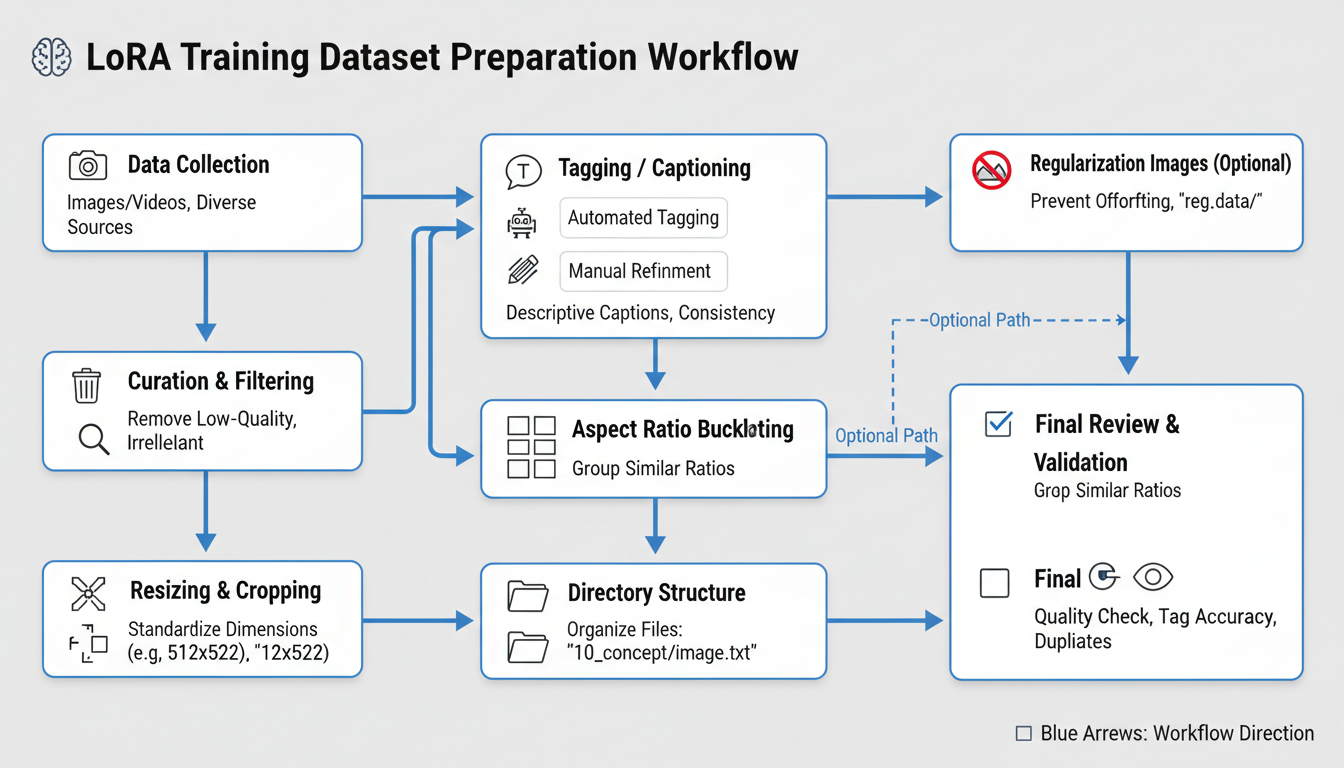 Proper dataset preparation workflow for character LoRA training
Image Processing
Prepare images for training:
Resolution: Resize to training resolution (typically 512 or 768).
Aspect ratio: Square crops work best, though rectangular supported.
Format: PNG preferred for quality, JPEG acceptable.
Naming: Sequential naming (01.png, 02.png) or descriptive.
Caption Creation
Each image needs a caption describing its content:
Basic format:
character_name, [description of pose/expression], [clothing], [background]
Example captions:
sarah_character, smiling, looking at viewer, casual dress, outdoor park
sarah_character, serious expression, profile view, business suit, office interior
sarah_character, full body, standing pose, red dress, studio background
Caption Best Practices
Consistency: Use same character name/token across all captions.
Specificity: Describe what's actually in each image.
Avoid redundancy: Don't include elements in every caption that should be learned.
Trigger words: Choose unique identifier unlikely to conflict with existing model knowledge.
Training Setup
Hardware Requirements
LoRA training needs capable hardware:
Minimum:
- 8GB VRAM GPU
- 16GB RAM
- 20GB storage for training
Recommended:
- 12GB+ VRAM GPU
- 32GB RAM
- SSD storage
Training time scales with hardware capability.
Software Options
Several approaches for training with ComfyUI:
Kohya_ss GUI: Popular external training interface.
ComfyUI training nodes: In-workflow training (less common).
A1111 training: Alternative if you use both interfaces.
Most users train externally and load resulting LoRAs into ComfyUI.
Training Environment Setup
Using Kohya_ss (most common approach):
- Clone or download Kohya_ss
- Install requirements
- Configure paths
- Prepare dataset folder
- Run training interface
Training Parameters
Key Settings Explained
Network rank (dim): Higher values capture more detail but increase file size. 16-64 typical for characters.
Network alpha: Usually half of rank. Affects learning rate scaling.
Learning rate: How fast the model learns. 1e-4 to 5e-4 typical.
Training steps: Total iterations. 1000-3000 for character LoRAs.
Batch size: Images per step. Limited by VRAM.
Recommended Starting Settings
For character LoRA:
Network rank: 32
Network alpha: 16
Learning rate: 1e-4
Steps: 2000
Batch size: 1-2
Resolution: 512 (or 768 with more VRAM)
Adjust based on results and hardware.
Training Epochs vs Steps
Epochs: Complete passes through dataset.
Steps: Individual training iterations.
For 20 images with batch size 1:
- 20 steps = 1 epoch
- 100 epochs = 2000 steps
Both approaches work. Steps provide finer control.
Running Training
Pre-Training Checklist
Before starting:
- Dataset images processed to correct resolution
- All images have captions
- Trigger word consistent across captions
- Enough storage for outputs
- GPU drivers updated
- Training parameters configured
Monitoring Training
Watch for:
Loss values: Should generally decrease, some fluctuation normal.
Sample outputs: If enabled, check periodically for quality.
Training time: Estimate completion based on steps/time.
Errors: Address any error messages promptly.
Training Checkpoints
Save checkpoints during training:
- Allows resuming if interrupted
- Enables comparing different training stages
- Provides backup if later steps overfit
Testing and Validation
Quick Testing
After training, test immediately:
- Load LoRA in ComfyUI
- Generate with trigger word
- Try various prompts
- Check character consistency
What to Look For
Good signs:
- Character recognizable across prompts
- Features consistent
- Natural looking outputs
- Works with various scenarios
Warning signs:
- Character only works with specific prompts
- Features inconsistent
- Artifacts or quality issues
- Overfitting to training images
Iteration
First training rarely produces perfect results:
If undertrained: Increase steps, check captions.
If overtrained: Reduce steps, add regularization.
If inconsistent: Improve dataset variety.
If wrong features: Review and improve captions.
Integration with ComfyUI
Loading LoRAs
In ComfyUI workflow:
- Add Load LoRA node
- Point to trained .safetensors file
- Connect to model pipeline
- Set strength (0.7-1.0 typical)
Combining with Other Methods
LoRAs work well with other consistency approaches:
LoRA + IP-Adapter: LoRA handles base character, IP-Adapter fine-tunes specific shots.
LoRA + ControlNet: LoRA for appearance, ControlNet for pose.
Multiple LoRAs: Style LoRA + Character LoRA for specific looks.
Workflow Integration
[Load Checkpoint]
 ↓
[Load LoRA] ← your character LoRA
 ↓
[CLIP Text Encode] ← include trigger word
 ↓
[KSampler]
 ↓
[VAE Decode]
 ↓
[Output]
Troubleshooting
Common Issues
Character not appearing:
- Check trigger word in prompt
- Increase LoRA strength
- Verify LoRA loaded correctly
Wrong features:
- Review training captions
- Check dataset for inconsistencies
- Retrain with improved data
Quality degradation:
- Reduce LoRA strength
- Check base model compatibility
- May be overtraining issue
Only works with specific prompts:
- Dataset too narrow
- Add more variety to training images
- Reduce training steps
Overtraining Prevention
Symptoms of overtraining:
- Outputs look exactly like training images
- Limited flexibility in generation
- Artifacts in outputs
Solutions:
- Use fewer training steps
- Add regularization images
- Increase dataset diversity
Advanced Techniques
Regularization Images
Adding images of the general concept (e.g., other people for person LoRA) prevents overfitting and maintains model knowledge.
Setup:
- Add regularization folder
- Include 100-500 relevant images
- Caption appropriately
Multi-Concept Training
Train multiple concepts in one LoRA:
- Character + specific clothing
- Character + specific style
- Multiple characters together
Requires careful dataset organization and captioning.
XY Plot Testing
Use ComfyUI XY plots to test:
- Different LoRA strengths
- Different base models
- Various prompts with LoRA
Systematic testing helps optimize usage.
Frequently Asked Questions
How many images do I need for good results?
15-50 typically works well. Quality and variety matter more than quantity.
How long does training take?
1-4 hours typically, depending on settings and hardware.
Can I train on generated images?
Yes, but quality must be high and consistent. Generated datasets can work well.
What base model should I train on?
Match the base model you'll generate with. SDXL models train SDXL LoRAs.
How do I know when training is done?
Test outputs. Good results with consistent character across various prompts indicates success.
Can I combine multiple character LoRAs?
Yes, but may require reducing individual strengths. Test combinations carefully.
What's the difference between LoRA and LORA?
Same thing, different capitalization. LoRA is technically correct.
How do I share trained LoRAs?
Upload .safetensors file to Civitai, Hugging Face, or share directly.
Conclusion
LoRA training provides the most reliable character consistency for long-term projects. While requiring more upfront investment than quick-fix methods, the results justify the effort for characters you'll use repeatedly.
Start with a quality dataset, use conservative training settings, and iterate based on results. Once trained, your character LoRA integrates smoothly into ComfyUI workflows, providing consistent results across any scenario you can imagine.
For quicker consistency methods when you don't want to train, see our IP-Adapter consistency guide. For complete character creation workflow, explore our .
Some models you cannot download at any VRAM
Veo, Kling and Nano Banana have closed weights. There is no local build, no quantization, no 24GB workaround. Run them in the browser instead. Check current model access and generation costs in the app.
Related Articles

25 ComfyUI Workflow Tips: Settings and Review
Explore ComfyUI workflow organization, settings and output review, with a blank worksheet for comparing performance on your own setup.
7 ComfyUI Custom Nodes That Should Be Built-In (And How to Get Them)
Essential ComfyUI custom nodes every user needs in 2025. Complete installation guide for WAS Node Suite, Impact Pack, IPAdapter Plus, and more...
ADetailer Single Character Focus - How to Target Specific Faces in Multi-Character Images 2025
Master ADetailer and FaceDetailer to focus on single characters in multi-person images. Complete guide to targeting specific faces with different prompts in ComfyUI.